




















Be the first to comment
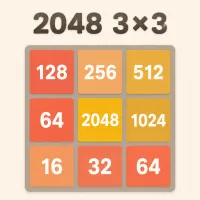
2048 3x3 compresses the familiar number-merging puzzle into a board with only nine cells. The rules remain simple, but the smaller layout leaves little room for an awkward tile or a careless swipe. Combine matching values, protect your remaining space, and build the largest tile you can while improving your score.
This version also gives each run a competitive side. You can monitor your current score and personal best, sign in to save results, compare leaderboard positions, or switch between light and dark themes for a more comfortable playing screen.
Every move shifts all available tiles up, down, left, or right. When two tiles with the same value meet, they combine into one tile worth twice as much. Two 2 tiles become 4, two 4 tiles become 8, and the same pattern continues through 16, 32, 64, and higher values.
A new low-value tile appears after a valid move, gradually reducing the amount of open space. You must keep creating useful pairs before the board becomes blocked. The run ends when all nine cells are occupied and no legal merge remains.
The long-term objective is to work toward the 2048 tile, but the compact grid makes every intermediate milestone meaningful. Reaching 128, 256, or 512 already requires a stable number chain and careful control of new tiles.
Classic 2048 uses a 4×4 grid with sixteen cells. The 3×3 version gives you only nine, so there is far less space for moving tiles into position or recovering after a mistake. A single number placed in the wrong row can separate two useful tiles and restrict several directions at once.
This limited space changes the priority of each move. A quick merge may increase the score, but it is not always the strongest choice if it breaks the order of your high-value tiles. Successful runs depend on balancing three goals: creating merges, protecting an empty cell, and keeping the board arranged for the next move.
The Score display tracks the points earned during your active run, while Best records your strongest result. These counters make it easy to measure improvement even when you do not reach the 2048 tile. A run with better board control can still become a new personal record.
The Undo button gives you a chance to return to the previous board state after an unhelpful swipe. It is useful for studying how one direction changes the whole grid, correcting an accidental input, or testing a difficult position more carefully.
Use the moon-shaped theme button to switch between day and night displays. The light theme keeps the original warm appearance, while the dark option provides a softer screen for playing in low-light conditions. Changing the theme affects presentation rather than the rules or score.
The profile menu allows you to sign in or create an account. Signing in saves your scores and connects your results to the leaderboard, so you can return later and continue tracking your performance under the same player profile.
The leaderboard adds a clear target beyond creating a single large tile. Rankings display each player’s position and score, with separate views for Today, Weekly, Monthly, and All Time. Short-term boards let you compete for a current ranking, while the all-time table shows the strongest recorded results.
You can also filter the standings by game mode and board size. The mode selector includes Classic, FUSE, and PLUS, while the size selector lets you view results for the 3×3 board separately. These filters help you compare scores earned under the same setup rather than mixing different types of runs.
Choose one corner at the beginning of the run and try to keep your largest tile there. A fixed anchor makes the board more predictable and reduces the risk of trapping an important number in the center.
Arrange the next-largest values beside the corner tile in descending order. For example, a sequence such as 128, 64, and 32 is easier to develop when the tiles remain connected along one edge. Scattering them across separate corners makes future merges much harder.
If your largest tile is in a bottom corner, favor moves toward that corner and avoid swiping upward unless the position demands it. Moving in the opposite direction can pull the anchor away and allow a new tile to occupy its place.
Open space is more valuable than a small score increase. Before making a move, check whether it creates a new merge and where the remaining tiles will land. Keeping one cell available gives you another chance to reorganize the grid after the next tile appears.
Undo is most useful when you compare two possible decisions or correct a genuine mistake. Planning first and reviewing the result will improve your pattern recognition more effectively than relying on repeated trial and error.